Documentation
The essentials
Getting started
about – an overview of xmonad featuresguided tour – a walkthrough of the basic functionality
step-by-step – guide to configuring xmonad
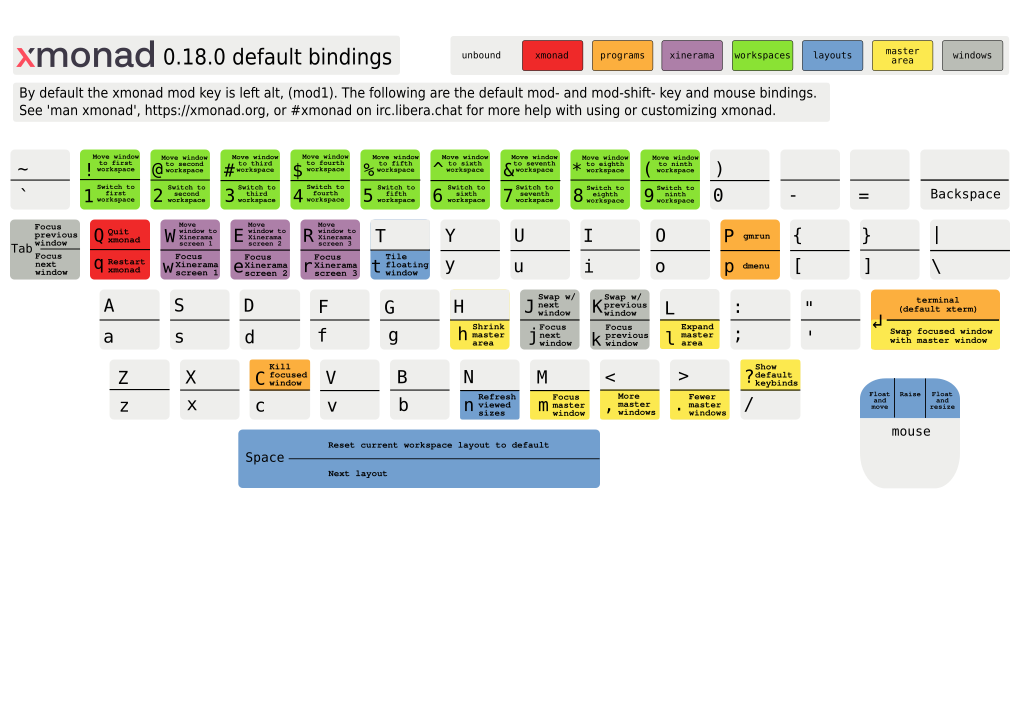
cheatsheet – an overview of the keybindings
Reference
manpage – a reference of the default keybindingsconfiguring – how to write a config file
template xmonad.hs – a complete config file that replicates the defaults
xmonad api docs – reference documentation for xmonad's core API
Extensions
extending – a roundup of many (but not all) of the modules in the contrib packageconfig archive – users' contributed config files, showing off many of the extensions
xmonad-contrib api docs – reference documentation for all of xmonad's contrib modules
development tutorial – learn to write your own extension
In your environment
Installing from tarball - Gnome - KDE - XFCE - Arch Linux - OS X - OLPCQuick start for the impatient
- Install the xmonad binary and config library.
- Wire xmonad up to your login manager.
- Logout and back in. You're in xmonad.
- alt-shift-enter to open an xterm.
- Write a ~/.xmonad/xmonad.hs to configure xmonad.
- mod-q to reload your config file.
- Install the xmonad-contrib config library.
- Edit your xmonad.hs to include this new fantasticness.
- mod-q to reload your config file.